 ToolRiot
We Used Crawl4AI to Turn Hacker News Into JSON
We asked a Python crawler for the headlines and links on Hacker News. It returned 30 records we could verify, plus a rendered page and a screenshot.
ToolRiot has no affiliate relationship with this tool. This coverage is based on our own testing and the tool's usefulness for the intended audience.
Contents · 4 sections
Each record is one story from the page: a headline and where it links.
[
  {
    "title": "Bonsai 27B: A 27B-Class model that runs on a phone",
    "url": "https://prismml.com/news/bonsai-27b"
  },
  {
    "title": "Dependabot version updates introduce default package cooldown",
    "url": "https://github.blog/changelog/2026-07-14-dependabot-version-updates-introduce-default-package-cooldown/"
  },
  {
    "title": "Financing the AI boom: from cash flows to debt [pdf]",
    "url": "https://www.bis.org/publ/bisbull120.pdf"
  }
]The full file was saved during the test, then read back and checked by a separate step. Your code would load it the same way.
Turning a live web page into useful data takes more than copying its text. Code needs predictable fields, clean links, and an output it can save, search, or pass to another step. Crawl4AI is a Python web crawler aimed at that job. In our test, we told it what to collect, story titles and links, and it handed back structured records.
We put that to the test in a clean container built for browser testing. If you want the exact commands and versions, they're in the Technical details at the end.
ToolRiot has no affiliate relationship with Crawl4AI. This coverage is based on our own testing and the tool's usefulness for the intended audience.
What we tried
We ran four checks.
Setup and health check. We installed Crawl4AI 0.9.1, ran its setup command, and used its built-in doctor check. Everything completed successfully.
Basic page crawl. We opened Example.com and saved the page as Markdown. The saved file contains the page's heading and text, readable as plain Markdown.
Hacker News extraction. We asked Crawl4AI to collect the headlines and links from Hacker News. It returned 30 records. We checked the first 10 and confirmed that every record included both a headline and a link. A sample of the saved records appears below.
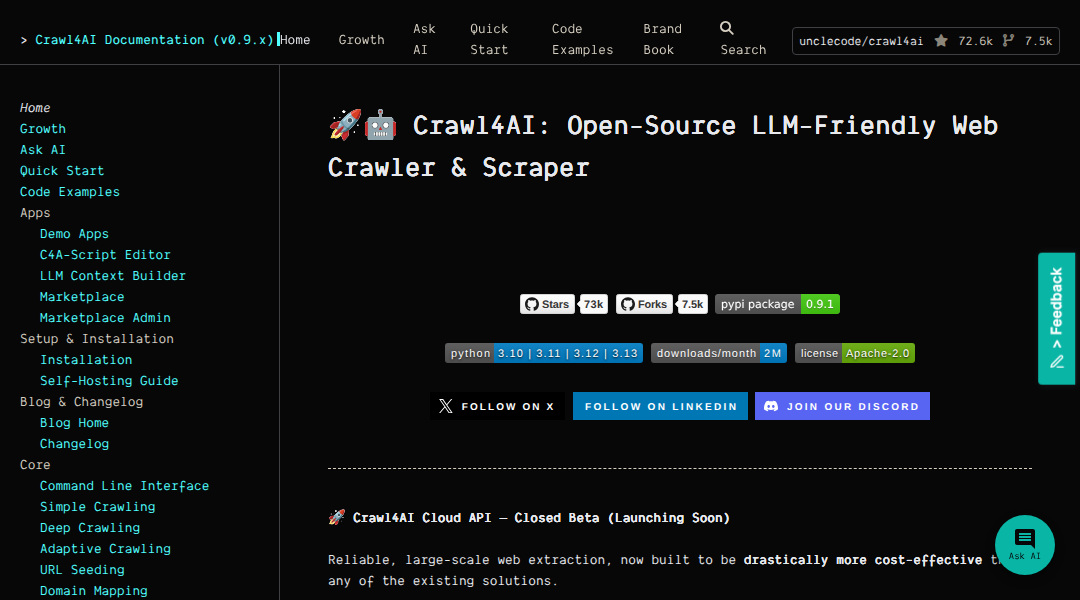
Browser rendering. We rendered the Crawl4AI documentation page in a real browser, which gave us both Markdown output and a screenshot. That's the screenshot further down this page.
Why this matters
Most scraping pain isn't fetching a page, it's turning the page into records your code can trust. Here that took a short description of the repeating part of the page and which fields we wanted from each item. Crawl4AI did the rest: the records went into a JSON file, and a separate check read that file back and verified a sample.
If the thing you're building needs page data in a predictable shape (a research script, say, or something that checks a source for you), this is the pattern to copy: pick a page with a repeating layout, describe the fields, and check the records that come back. We validated the file itself; where it goes next is your call.
What setup looks like
You'll need Python and a browser. We installed Crawl4AI with one pip command, then ran its own setup command, which downloaded the browser build it renders with, and its doctor check, which ran a small test crawl and reported success.
Our container came prepared for browser work; after the pip install, the setup command still downloaded a headless browser build of its own. Run the doctor check and read its output before you write any code.
Who it's for
Crawl4AI fits developers and technical researchers who want to write extraction rules in Python and need structured records from public pages with repeating layouts. That's where it delivered for us: a small schema in, a checked JSON file out.
It's less comfortable if you just want to grab a page now and then without writing code, or if you can't set up Python and a browser where your code runs. And don't build a workflow on a source you haven't checked with a small test crawl first. Our results cover Hacker News, a simple test page, and one documentation site, not the whole web.
The clearest way to evaluate it: pick one public listing page, describe the fields you want, run the extraction, and read the JSON you get back before wiring it into anything bigger. For technical readers, it's a solid starting point for structured web collection.
- ✓ Developers who need consistently shaped records from web pages
- ✓ Technical readers comfortable writing extraction rules in Python
- ✓ Public directories, documentation indexes, article feeds, and other repeating layouts
- ✓ Scripts that save page data as JSON for later review
- · Copying a page now and then without writing code
- · Environments where you can't set up Python and a browser
- · Sources you haven't checked with a small test crawl first
Crawl4AI did what we asked of it: the full install sequence completed, it turned Hacker News into 30 records (we confirmed the first 10 were complete), and it rendered a page to text and a screenshot. If you can set up Python and a browser and your target pages have repeating layouts, it's a solid starting point for structured web collection.
Visit the project →non-affiliate link. We earn nothing from itTechnical details
- Environment
mcr.microsoft.com/playwright/python:v1.61.0-noble · Python 3.12.3 · Ubuntu 24.04 x86_64- Versions
Crawl4AI 0.9.1 · Playwright 1.61.0 · Chromium 149.0.7827.55- Install
virtualenv venv && ./venv/bin/pip install crawl4ai && ./venv/bin/crawl4ai-setup && ./venv/bin/crawl4ai-doctor (all exit 0)- Basic crawl
AsyncWebCrawler → https://example.com/ → artifacts/example-domain.md sha256 afbe8ebdfffe8026d9bec5c5b006005661c1f715df2d060fec6cea228b9aa28a- Extraction
JsonCssExtractionStrategy, baseSelector tr.athing, fields title + url → artifacts/hn-stories.json, 30 records sha256 a367a666e9d38464e29728375c3d494d3fda151bdc3704194c37c3eaaa492884- Validation
a separate step parsed the JSON with python's json module and checked the first 10 records for both fields- Rendering
CrawlerRunConfig(screenshot=True) → docs.crawl4ai.com → 13,862 chars Markdown + artifacts/docs-screenshot.png (116,243 bytes) sha256 4007696e1c08b68f8431c31fd4281a1673b70446c019abba2ab34b5aeb272337- Published screenshot
the image shown above (/evidence/crawl4ai-docs-screenshot.png) is a byte-identical copy of artifacts/docs-screenshot.png, same sha256 4007696e1c08b68f8431c31fd4281a1673b70446c019abba2ab34b5aeb272337
What our test showed
Everything below comes from our own test: real tasks, real output, no vendor screenshots.
Turns pages into Markdown
We pointed it at a simple public page and got the content back as readable Markdown.
✓ The saved file contains the page's heading and text.
Best for Clean page text for scripts and notesExtracts structured records
We described the repeating part of Hacker News and the two fields we wanted from each story.
✓ It returned 30 records, and the first 10 all included both a headline and a link.
Best for Turning listing pages into dataRenders pages in a real browser
It loaded the Crawl4AI documentation site the way a browser does, not just the raw HTML.
✓ One run gave us both the page text and a screenshot.
Best for Pages that only make sense after they renderHow you'd use it
Prepare Python and a browser
Install Crawl4AI, then run its setup command. In our run, setup downloaded a headless browser build.
Crawl a page
Point it at a URL and you get the page back as Markdown.
Describe the fields you want
For structured data, tell it what the repeating part of the page is and which fields to collect from each item.
Check the saved records
Read the JSON you get back before wiring it into anything bigger. Turn on screenshots when you also want an image of the rendered page.
Read how we test AI tools and our editorial policy.